
A corporate website structure is the framework that holds everything else together: design, copy, SEO and enquiries. When pages are put together at random, visitors cannot find the service they need and search engines cannot tell which queries the site should rank for.
Let us look at which pages a company really needs, in what order to plan the structure, and how to link sections so the path from first visit to enquiry stays short.
Why Structure Matters More Than It Seems
Structure solves two problems at once. For people, it is clear navigation: in a couple of clicks they understand what you do, what it costs and how to reach you. For search engines, it is a set of pages, each answering its own group of queries.
One page, one topic, one group of queries. If all your services sit on a single page, ranking each of them separately is nearly impossible. Give every service its own page and it gets a real chance to appear for its target query.
Rebuilding the structure after launch costs more: URLs change, redirects are needed, menus and copy get reworked. That is why it is planned before design and front-end work.
Example. A company installs ventilation, air conditioning and heating for flats, offices and factories. A logical structure is a Services section with three directions, each containing pages for specific work: design, installation, maintenance. Separate pages by property type make sense only if there is demand for them and you have something substantial to say about each.
Essential Pages of a Corporate Website
The minimum set without which a site looks unfinished and loses trust:
- Home page. Briefly explains who you are, who you serve and why you can be trusted. Leads into key sections.
- Services or products. A catalogue section plus a separate page for each service: description, stages, prices or a price guide, examples, enquiry form.
- About us. History, approach, team, documents and company details. A trust page, not a place for vague statements.
- Portfolio or case studies. Real projects with the task, the solution and the outcome.
- Contacts. Phone, messengers, address, map, opening hours, company details.
- Privacy policy. Required whenever your forms collect personal data.
Service pages matter most for sales. A good one answers questions in the order they arise: what you do, for whom, how the work goes, what it costs and how long it takes, what proves your experience, and what to do next. If one answer is missing, the customer goes looking for it elsewhere. Design the service page template once and apply it to every direction.
Pages That Build Trust and Drive Sales
Additional sections depend on your niche but often pay off:
- Pricing. Even a starting price answers the main question and filters out poor-fit leads.
- FAQ. Handles objections and captures informational queries.
- Reviews. Ideally linked to map listings and platforms where they can be verified.
- Certificates, licences, partners. Especially important in B2B, healthcare and construction.
- Blog or knowledge base. Attracts traffic from informational queries and leads readers to services.
- Careers, partner or dealer pages — if they are part of your business model.
Do not add sections just to tick a box. An empty blog with two news items from three years ago does more harm than having no blog at all.
If you operate in several cities or serve different industries, separate landing pages by region or sector can help. But each one must carry unique, useful information: local contacts, terms, project examples. Copies with only the city name swapped are recognised by search engines as low value.
How to Plan a Corporate Website Structure Step by Step
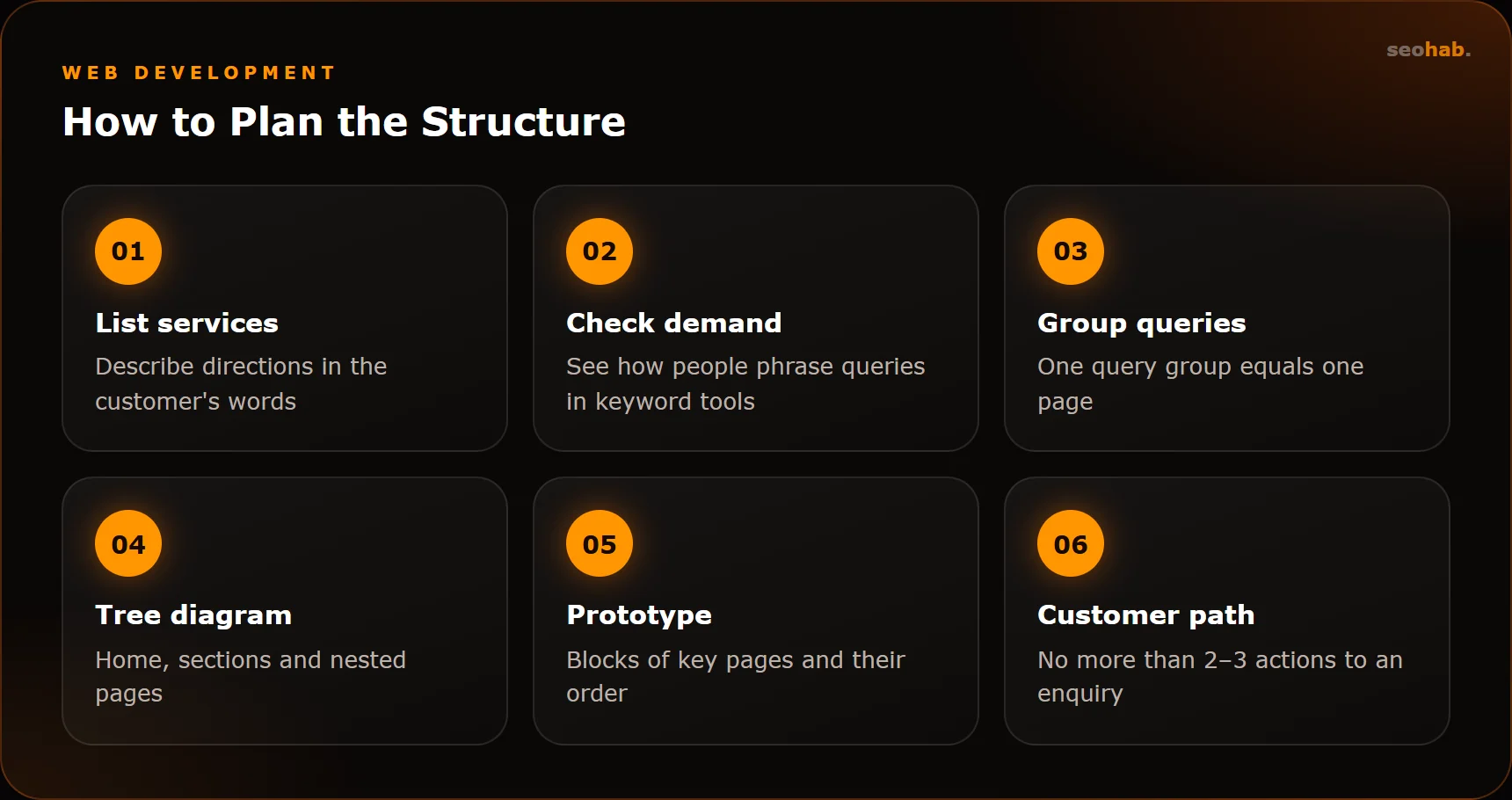
- List your services and lines of business the way customers understand them, not the way internal documents name them.
- Check demand. Use Yandex Wordstat or Google Keyword Planner to see how people phrase queries for each service. If a direction has noticeable demand, it deserves its own page.
- Group queries by meaning: each group becomes a page, related groups become a section.
- Draw a tree diagram: home, sections, nested pages. A sheet of paper or an online whiteboard is enough.
- Build a prototype of key pages: which blocks, in what order. This is where website design and prototyping before development helps.
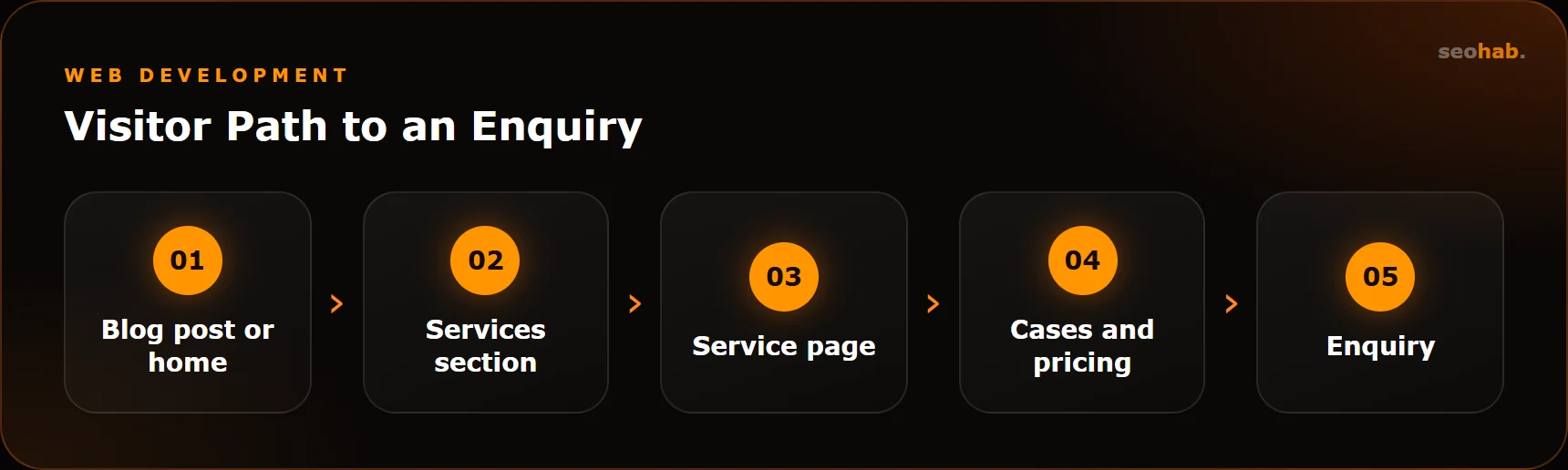
- Test the customer path: from any page to an enquiry should take no more than two or three actions.
How to Connect Pages: Navigation and Internal Linking
Main Menu and Footer
Keep 5–7 key sections in the menu. Move a long service list into a dropdown or a catalogue page. Repeat important links, contacts and legal pages in the footer.
Breadcrumbs
A trail like Home → Services → Service name shows visitors where they are and tells search engines how the site is organised.
Contextual Links
Link pages by meaning: from a case study to the service used in it, from a blog post to the matching service, from a service page to related services and cases. Every important page should receive links from other pages, otherwise it gets lost for both users and crawlers.
Calls to Action
Every service page needs a clear next step: a form, a call button, a messenger link. For more on turning visits into enquiries, see our guide on website conversion.
URLs and the Technical Foundation
- Use readable Latin-character URLs that mirror the hierarchy: /services/ventilation-installation.
- Avoid nesting deeper than three or four levels unless truly needed.
- Give every page a single H1 and a unique title and description.
- Set up sitemap.xml and add the site to Google Search Console and Yandex Webmaster.
- Crawl the site with Screaming Frog to find orphan pages, broken links and duplicates.
You can test a finished structure without a specialist. Ask someone unfamiliar with your company to find a specific service, its price and a way to get in touch. Time them and note where they hesitate. Then check your analytics: which pages most often end a visit, and where visitors go from the home page. The places where people get lost are the weak links in your structure.
Common Mistakes
- All services on one page. Such a site is hard to promote and hard to read.
- Structure that mirrors your org chart. Customers do not care about your departments, they want their problem solved.
- Duplicates. Two pages targeting the same query compete with each other.
- Dead-end pages with no further links and no enquiry form.
- Changing URLs without redirects with every update.
We cover more problems like these in our article on website mistakes that kill sales.
Summary
A good corporate website structure is built around customers and search demand: a separate page for every meaningful service, a clear menu, breadcrumbs and thoughtful internal linking. The essential minimum is a home page, services, about us, case studies, contacts and a privacy policy. Add extra sections only if you are ready to keep them filled.
If you are planning a new site or want to rebuild your current one, start with a diagram and a prototype. We can design the structure and build a corporate website around your goals.
Read also
 Development
Website Lead Forms: How to Make Sure No Inquiry Gets Lost
Why website inquiries get lost and how to fix it: reliable delivery, notifications, CRM and Telegram, spam protection, analytics goals and regular form testing.
 Development
Website Loading Speed and Core Web Vitals: What Affects LCP, INP and CLS and How to Speed Up Your Site
What Core Web Vitals are, which LCP, INP and CLS values count as good, how to test your website’s loading speed and what actually makes it faster.
 Development
How to Write a Website Technical Specification: What to Include, Template and Mistakes
How to write a website technical specification without a tech background: a section template, example wording and the most common mistakes.