
Website lead forms are where advertising and SEO turn into revenue. They are also one of the most fragile parts of a site: an email lands in spam, the manager is on vacation, a form breaks after an update — and nobody ever finds out about the lost customers. The business only notices that there are somehow fewer inquiries.
In this article, we look at where website leads get lost and how to build a chain in which every inquiry reaches the right person and is counted in your analytics.
Where website leads get lost
Losses rarely happen in one place but at the joints: between the form and email, between email and the manager, between the manager and the CRM. Typical scenarios:
- emails go to spam or are never sent, because the site sends mail without proper authentication;
- notifications go to an inbox nobody reads — for example, a former employee's address;
- a form stops working after a CMS or plugin update, and nobody notices for weeks;
- real inquiries drown in spam and get overlooked;
- a lead is received but not recorded anywhere, and within a couple of days it is forgotten.
Hence the key principle: every lead should be stored in at least two independent places and have an owner who sees it immediately.
Reliable delivery: set up email properly
The most common technical cause of lost leads is sending emails with the server's default mail function. Mail providers often treat such messages as suspicious and either send them to spam or reject them.
What to do:
- send emails via your business mailbox's SMTP or a transactional email service rather than the server's mail() function;
- set up SPF, DKIM and DMARC records for your domain — they prove that the email really came from your site;
- use a sender address on your own domain, not on a free email service;
- write a clear subject line: "Website inquiry: callback request" instead of a generic "New message".
An extra safety net is saving every submission in the site's database. Even if the email is lost, the inquiry can still be found in the admin panel.
Notifications: Telegram and email
Email works well as an archive but poorly for quick reactions. Response speed has a direct impact on whether a person becomes a customer: while you call back the next day, they have already agreed with whoever replied within ten minutes.
A convenient setup for small businesses is to duplicate leads into Telegram — to the owner's private chat or to the sales team's group. The notification reaches a phone instantly, several people see it at once, and it is always clear who has taken the lead.
A notification should include more than just a name and a phone number. Add context:
- which page and which form the lead came from;
- the selected service, product or calculator settings;
- the traffic source — UTM tags from your ads;
- the date and time of the inquiry.
That way, the manager understands what the customer needs before calling and does not have to ask unnecessary questions.
Agree in advance who handles weekend leads, who covers vacations and how fast to call back. Otherwise the notification arrives, but nobody picks it up.
CRM: leads should not live in an inbox
Once you get more than a few inquiries a day, email and messengers stop coping. You need a system where every inquiry has a status, an owner and a history. That is what a CRM is for.
Integrating your forms with a CRM gives the business several things at once:
- every submission automatically becomes a deal or a lead, with no manual copying;
- the manager gets a task with a deadline, and the owner sees overdue ones;
- repeat inquiries are merged with the existing customer record;
- you can count how many website leads turned into sales, and from which sources.
The connection is usually made via the CRM's official API or webhooks. Make sure the CRM receives the same fields as the notification, including UTM tags — otherwise you will not be able to link advertising to sales.
If you do not have a CRM yet, start with at least a shared spreadsheet that leads are added to automatically. It gives you one list of inquiries that does not depend on anyone's inbox.

Spam protection without losing real leads
Form spam is more than a nuisance. It clutters the CRM, distracts managers and hides genuine inquiries. But overly strict protection hurts too: a complicated captcha scares people away.
Methods that work without bothering visitors:
- a hidden honeypot field — people do not see it, bots fill it in, and such submissions are filtered out;
- an invisible captcha, such as reCAPTCHA or Yandex SmartCaptcha, that challenges only suspicious visitors;
- a fill-time check: a form submitted one second after the page loads was almost certainly filled in by a bot;
- input masks and format validation for phone numbers and emails.
Do not delete filtered submissions without a trace — keep them in a separate log. That way you can check whether real customers are ending up there by mistake.
The form itself: fewer fields, more leads
Reliable delivery will not help if people do not want to fill in the form. A few rules for a user-friendly form:
- ask only for what you need to get in touch — usually a name and a phone number are enough;
- explain what happens next: "We will call you back within 15 minutes during business hours";
- show a clear success message instead of just clearing the fields;
- add consent to personal data processing and a link to your privacy policy;
- test the form on a phone: fields should be easy to tap, and the right keyboard should open for the number.
For more on how design and copy affect the number of inquiries, see our guide on increasing website conversion.
Analytics and testing: every lead is counted
Without analytics, you cannot tell which channels bring inquiries or notice a breakdown in time. Set up goals in Yandex Metrica and events in GA4 for the successful submission of each form — the successful submission, not the button click.
Then compare the numbers: the count of goals in analytics should roughly match the number of leads in the CRM. If analytics shows leads but the CRM has fewer, something is getting lost along the way. If leads suddenly drop to zero, the form itself has most likely broken.
Track phone and messenger clicks separately: many customers prefer to call or text.
How to test your forms yourself
A ten-minute check saves you from unpleasant surprises. Do it after every site update and at least once a month:
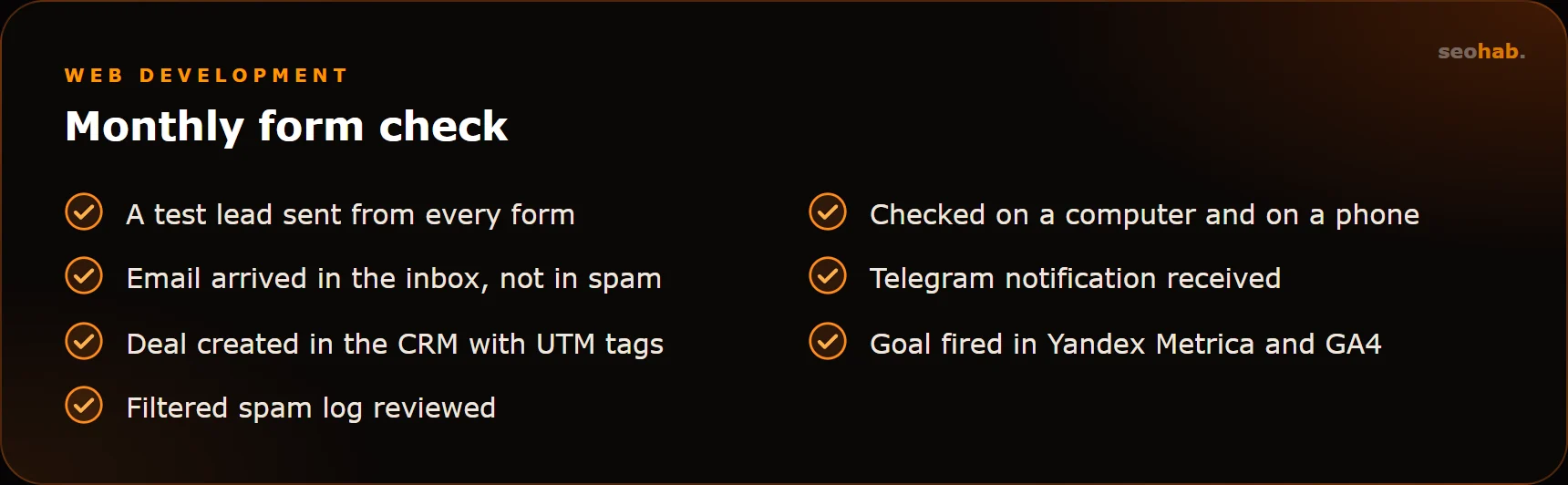
Send a test inquiry from every form — from a computer and from a phone — and follow the whole path: email, Telegram, CRM, analytics goal. Label test leads so they do not distort your reports.
In short
To make sure website lead forms do not lose customers, you need a chain with no weak links: reliable email delivery, instant Telegram notifications, automatic CRM integration, smart spam protection and analytics goals. Plus regular testing of the entire chain instead of hoping that everything just works.
If you would like this set up for you, take a look at our lead automation and CRM integration service. And if your site's forms need to be rebuilt or fixed, we can help as part of website improvements.
Read also
 Development
Corporate Website Structure: Which Pages You Need and How to Connect Them
Which pages a corporate website needs, how to plan its structure around search demand, and how to link sections so visitors reach the enquiry form fast.
 Development
Website Loading Speed and Core Web Vitals: What Affects LCP, INP and CLS and How to Speed Up Your Site
What Core Web Vitals are, which LCP, INP and CLS values count as good, how to test your website’s loading speed and what actually makes it faster.
 Development
How to Write a Website Technical Specification: What to Include, Template and Mistakes
How to write a website technical specification without a tech background: a section template, example wording and the most common mistakes.