
Website loading speed affects everything at once: how many visitors wait for the page, how many of them leave a request and how search engines evaluate the site. To measure speed objectively rather than by feel, Google introduced a set of metrics called Core Web Vitals — LCP, INP and CLS.
In this article we explain in plain words what each metric means, which values count as good, how to test your site, and which actions genuinely speed it up versus those that only polish the numbers in a report.
What are Core Web Vitals
Core Web Vitals are three metrics that describe how a user experiences page loading and interaction. Not “how heavy the site is”, but how quickly a person sees content, can interact with it and is not bothered by a jumping layout.
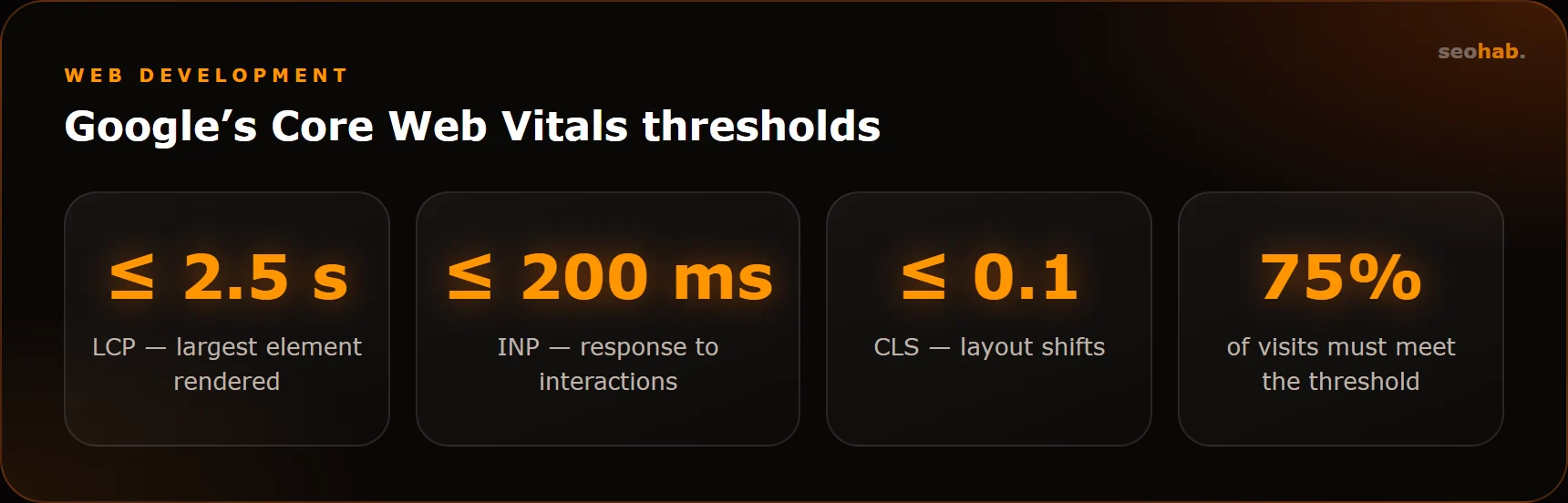
- LCP (Largest Contentful Paint) — the time it takes to render the largest element on the first screen: the main image, a banner or a big heading. Good is 2.5 seconds or less.
- INP (Interaction to Next Paint) — how quickly the page responds to actions: a click, a tap, typing. Good is 200 milliseconds or less. In 2024 INP replaced the older FID metric.
- CLS (Cumulative Layout Shift) — how much elements shift during loading. Good is 0.1 or less.
Google evaluates the metrics at the 75th percentile: a page counts as fast if at least 75% of real visits get good values — not just you on an office computer with fast internet.
Why website loading speed matters for business
A slow site loses people before they even see the offer. This is especially noticeable on mobile: an unstable signal and a weak processor turn a page that loads fine on desktop into a waiting game.
- Conversion. A visitor who waits too long or misses a button that jumped is less likely to submit a request.
- Advertising. You pay for the click even if the person left before the page loaded.
- SEO. Core Web Vitals are part of Google’s page experience signals. They are not the main ranking factor, but all else being equal, the faster site wins. Speed also shapes user behavior, which both Google and Yandex take into account.
Keep in mind that speed does not replace useful content and sound structure — it amplifies them. For how speed fits into the overall strategy, see our article on how to promote a website in 2026.
How to check speed and Core Web Vitals
Start with free tools. It is important to distinguish between two types of data:
- Field data — real visits from Chrome users over the last 28 days. This is what Google uses.
- Lab data — a one-off test in simulated conditions. Useful for finding causes and verifying fixes.
Where to look:
- PageSpeed Insights. Enter a page URL. At the top you will see field data (if there is enough traffic), below — a Lighthouse lab test with specific recommendations. Check the “Mobile” tab first.
- Google Search Console. The Core Web Vitals report groups your pages by status: good, needs improvement and poor.
- Chrome DevTools. The Performance tab shows exactly what slows loading and which scripts block responsiveness.
Do not chase a perfect 100 in Lighthouse. The score is a guide; the goal is green field metrics for key pages: home, services, catalog and product pages.
What affects LCP and how to improve it
LCP is most often ruined by heavy first-screen images, a slow server response and resources that block rendering.
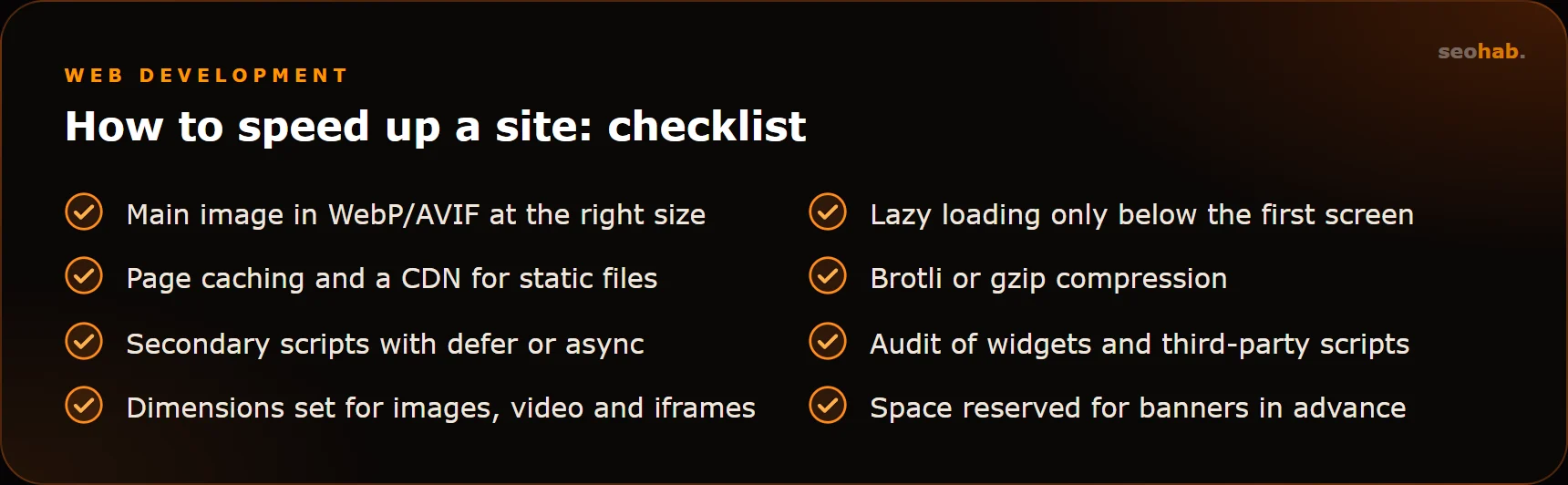
- Optimize the main image. Use modern formats such as WebP or AVIF, size it for the screen, and serve responsive versions for mobile.
- Do not defer the first screen. Lazy loading is for images further down the page, not for the hero banner. The hero actually benefits from a higher loading priority.
- Speed up the server response. Page caching, decent hosting, a CDN for static files, Brotli or gzip compression.
- Remove render-blocking resources. Critical styles go first; secondary scripts get defer or async attributes.
What affects INP and CLS
INP: responsiveness
INP suffers when the browser is busy running JavaScript and cannot respond to a click right away. Typical causes are heavy themes and page builders, dozens of plugins and third-party widgets: live chats, quizzes, counters, social buttons.
- Audit third-party scripts and keep only the ones you actually use.
- Load widgets lazily, after the main content or on user action.
- Break up long JavaScript tasks and avoid heavy computations in click handlers.
CLS: layout stability
CLS grows when elements appear and push content around: an image without set dimensions, an ad block, a cookie banner at the top, a web font loading late.
- Set width and height (or aspect ratio) for images, videos and iframes.
- Reserve space for banners and dynamic blocks in advance.
- Configure font loading so that swapping fonts does not noticeably change text size.
- Show notifications on top of content rather than pushing it down.
Where to start: the order of work
With many issues, it is easy to spread yourself thin. Move from simple and cheap to complex:
- Record the baseline. Save PageSpeed Insights results for 5–10 key pages so you can compare later.
- Make quick fixes. Image compression, caching, disabling unused plugins and widgets. This often improves LCP noticeably without touching the code.
- Fix the layout. Element dimensions, font loading, the order in which styles and scripts load.
- Assess the server. If response time stays high even with caching, the problem may be the hosting or the CMS code itself.
- Re-test and wait. A lab test shows results immediately, while field data updates gradually over roughly four weeks.
Sometimes the honest audit conclusion is that the theme or builder is too heavy, and rebuilding the template is easier than endlessly patching it with plugins.
Common mistakes when speeding up a site
- Installing a “speed” plugin and calling it done. Plugins help with caching and compression but will not fix a heavy theme or unnecessary scripts. Sometimes they even break the layout.
- Optimizing only the home page. Customers often land from search straight on service and product pages — those must be fast too.
- Testing only on desktop. Mobile results are almost always worse, and they matter more.
- Speeding up once and forgetting. New banners, plugins and widgets gradually bring the site back to where it was. Check the Search Console report at least once a month.
- Sacrificing usability for a score. Removing the request form to improve the numbers is a bad trade.
Summary
Website loading speed is measured not by feel but by Core Web Vitals: LCP up to 2.5 s, INP up to 200 ms and CLS up to 0.1 for most real visits. Test your key pages in PageSpeed Insights and Search Console, then start with the main image, third-party scripts and element dimensions — these give the biggest effect for reasonable effort.
If you need help, SeoHab specialists can audit your site and carry out website improvements for Core Web Vitals, and our website support team will make sure speed does not drop after updates. Discuss your task via the contacts page.
Read also
 Development
Website Lead Forms: How to Make Sure No Inquiry Gets Lost
Why website inquiries get lost and how to fix it: reliable delivery, notifications, CRM and Telegram, spam protection, analytics goals and regular form testing.
 Development
Corporate Website Structure: Which Pages You Need and How to Connect Them
Which pages a corporate website needs, how to plan its structure around search demand, and how to link sections so visitors reach the enquiry form fast.
 Development
How to Write a Website Technical Specification: What to Include, Template and Mistakes
How to write a website technical specification without a tech background: a section template, example wording and the most common mistakes.