
A website redesign without losing traffic is achievable, but only if you treat it as a technical migration rather than a visual refresh. A new design almost always brings new markup, a new structure and often a new CMS. Any of these changes can wipe out what the site has earned in search over the years.
Below is a step-by-step plan for keeping rankings and traffic: what to record before work starts, how to prepare redirects, what to check before launch and what to watch in the first weeks after it.
Why Traffic Drops After a Redesign
Search engines rank specific pages at specific addresses. When either changes without preparation, the site loses what it has built up. Typical causes of a drop:
- URLs changed with no redirects — old pages return 404 errors and links to them lose their value;
- copy, H1 headings, titles and descriptions were lost during the move;
- pages that brought traffic were deleted because they did not fit the new design;
- the new site was never opened for indexing after moving from the staging server;
- the site became slower or works worse on phones;
- analytics counters and goals broke, and nobody noticed for a month.
All of these mistakes are predictable, which means they can be prevented.
Step 1. Record the Current State of the Site
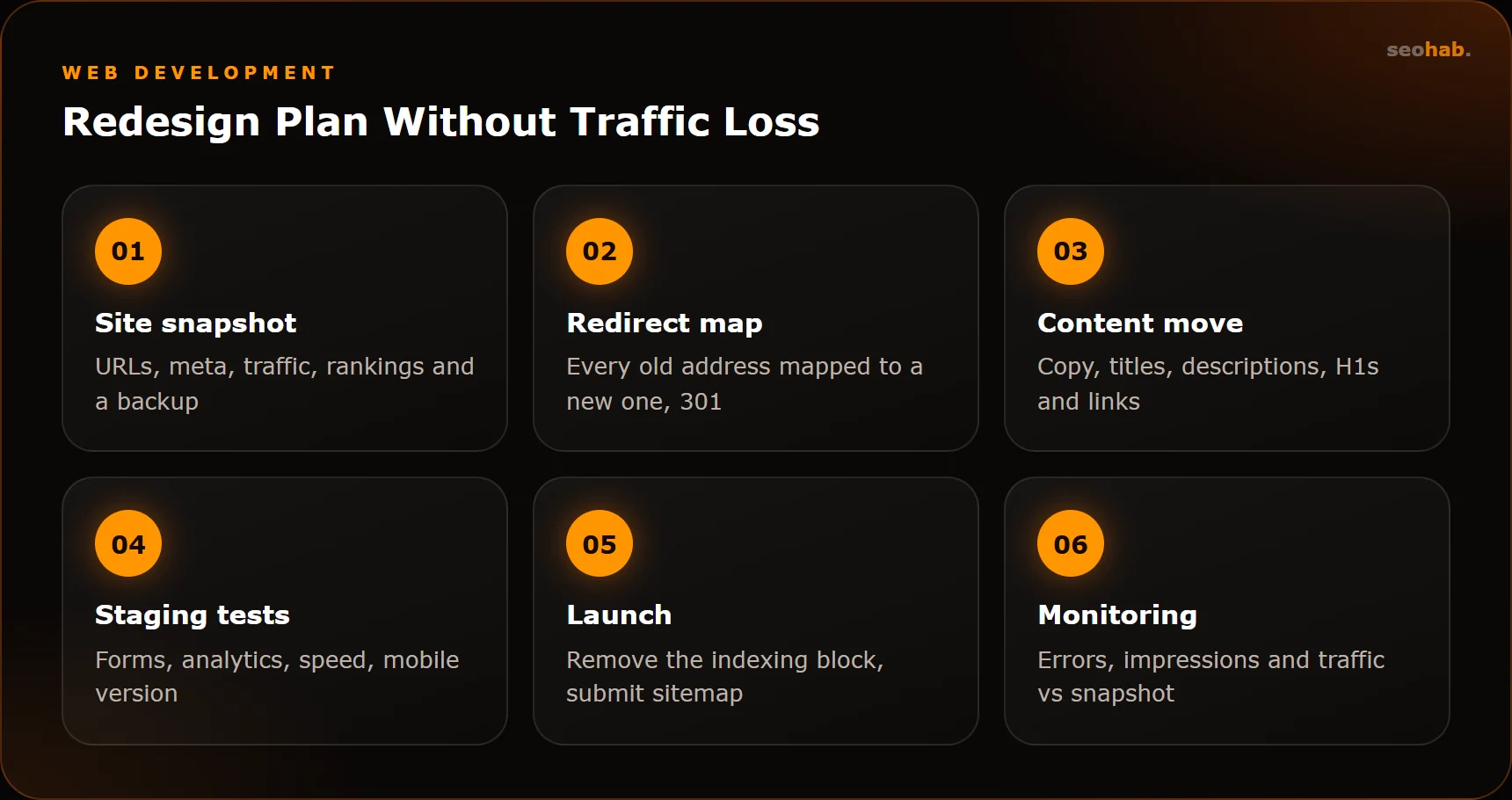
Before work begins, take a snapshot of the site to compare results against later:
- Export all site URLs with Screaming Frog, including titles, descriptions, H1s, status codes and canonical URLs.
- Export pages with impressions and clicks, and the queries they rank for, from Google Search Console and Yandex Webmaster.
- Save landing-page traffic and conversions for recent months from GA4 and Yandex Metrica.
- Record rankings for key queries.
- Make a full backup of files and the database.
Flag the pages that bring traffic and leads: they take priority in the move, and deleting them must be a deliberate decision.
If the domain changes along with the redesign, the plan gets more complex. Besides redirecting every page of the old domain to its counterpart on the new one, you need to notify search engines: Google Search Console has a Change of Address tool, and Yandex Webmaster has a Site Move tool.
Step 2. Keep URLs or Prepare a Redirect Map
The best option is to keep page addresses unchanged. If that is impossible — for example, when switching CMS or structure — build a redirect map: a table matching every old address to a new one.
| Old URL (example) | New URL (example) | Code |
|---|---|---|
| /index.php?route=services&id=12 | /services/installation | 301 |
| /about-us.html | /about | 301 |
| /news/old-promo | /blog | 301 |
Rules for the map:
- Use permanent 301 redirects, not temporary 302 ones.
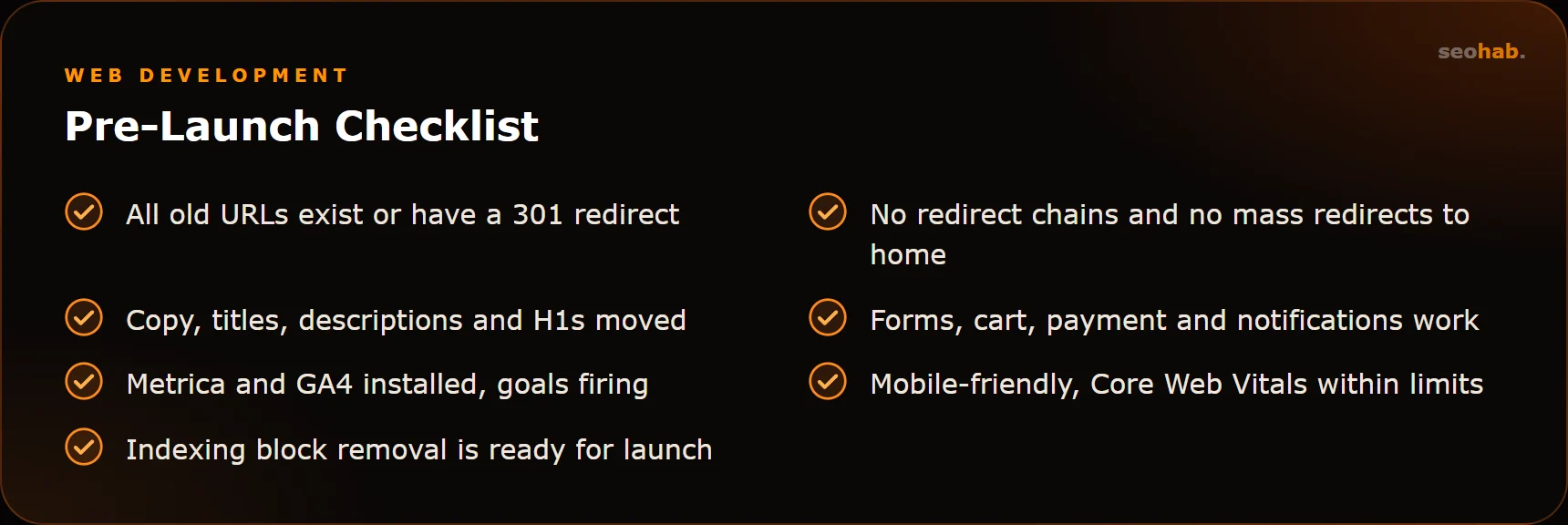
- Redirect to the closest matching page, not everything to the home page.
- Avoid chains: an old address should reach the final URL in a single hop.
- Include images and documents if they have external links or image search traffic.
- Settle trailing slashes and the www versus non-www version consistently.
If a page is removed for good and has no close replacement, returning 404 or 410 is acceptable. But first check the export for traffic and external links: if it has either, redirect it to the parent section instead.
Step 3. Move Content and Meta Tags
Designers often trim copy for the sake of a clean layout. For search, that is risky: a page's text is what it ranks for. You can improve and restructure it, but do not throw it away.
For every important page, check that:
- titles and descriptions were moved or improved, not replaced by a template;
- there is a single H1 that matches the page topic;
- main copy, subheadings and answers to questions are preserved;
- internal links and breadcrumbs are kept;
- structured data is preserved if it existed;
- images have alt attributes.
Design the new layout with these blocks in mind. If the site is being promoted, bring an SEO specialist into prototype discussions, not after development.
Step 4. Test the New Site Before Launch
The new version is built on a staging domain. Block it from indexing — with a password or with robots.txt and a robots meta tag — otherwise a duplicate of your site ends up in search.
Before launch, check:
- every page from the export exists on the new site or has a redirect;
- forms, cart, payment and lead notifications work;
- GA4 and Metrica counters are installed and goals fire;
- the site looks and works correctly on phones;
- speed in PageSpeed Insights, with LCP ≤ 2.5 s, INP ≤ 200 ms, CLS ≤ 0.1 as the benchmark;
- there are no broken links or orphan pages — Screaming Frog will show them.
Step 5. Launch
Pick a launch day when the team can fix issues quickly — not Friday evening and not just before a holiday. On release day:
- Deploy the site and switch on the redirect map.
- Remove the indexing block left over from staging. This is the most common and most painful mistake.
- Spot-check 20–30 old URLs: each should return a 301 and lead to the right page.
- Update sitemap.xml and submit it to Google Search Console and Yandex Webmaster.
- Request recrawling of key pages through the webmaster tools.
- Submit a test enquiry and make sure it arrives and the goal is recorded.
Monitoring After Launch
Small ranking fluctuations in the first weeks after a redesign are normal: search engines need time to recrawl the site. What matters is telling temporary swings from a real problem.
- First days: watch for 404 and 5xx errors in Search Console and Yandex Webmaster, check server logs and coverage reports.
- First weeks: compare impressions, clicks and landing-page traffic with your snapshot. If a specific page dropped, compare its old and new versions.
- First months: track rankings, conversion and visitor behaviour. We explain how behaviour affects rankings in our article on behavioural factors.
Keep redirects for at least a year, ideally permanently: external links and bookmarks keep pointing to old addresses.
If a drop drags on, work through it methodically. Find the pages that lost the most clicks and compare them with your snapshot: URL, redirect, title, H1, copy, internal links, speed. The cause is usually in one of these, and once fixed the page gradually recovers. To make such checks routine rather than a post-release exercise, consider ongoing website support.
Summary
A website redesign without losing traffic comes down to this: record the current state, keep URLs where possible, prepare a 301 redirect map, move copy and meta tags, test before launch and monitor closely afterwards. Most drops are caused not by the design itself but by skipped technical steps.
If you are planning an update, we can help you run it carefully, from audit to post-launch monitoring. See our website rework and redesign and SEO services.
Read also
 Development
Website Security: Hack Protection, Updates and Backups — a Practical Minimum for Business
A practical website security minimum: updates, passwords and access, backups, monitoring and a clear plan for what to do after a hack.
 Development
Website Prototype: Why You Need One, How It Is Built and How It Differs from Design
What a website prototype is, which problems it solves before design and coding begin, how prototyping works and what to check before sign-off.
 Development
Which Features an Online Store Needs at Launch and What Can Wait
The must-have feature set for launching an online store, and the list of things better added after your first sales and analytics data.