When deciding which features an online store needs at launch, it is easy to fall into one of two traps. The first is going live with a bare catalogue where choosing is awkward and paying is impossible. The second is spending six months on a loyalty programme, product comparison and a mobile app without selling anything.
Below is a practical breakdown: what must work on day one, what is nice to have, and what is better postponed until you have real orders and analytics data.
The Launch Principle: A Minimum Sufficient Store
The launch version has one job: help customers find a product, understand the terms and place an order without effort. Anything that does not support those three actions can wait.
Minimum does not mean sloppy, though. The catalogue, product pages, cart and payment must be done well, because that is where customers decide. Save on the number of features, not on the quality of the core ones.
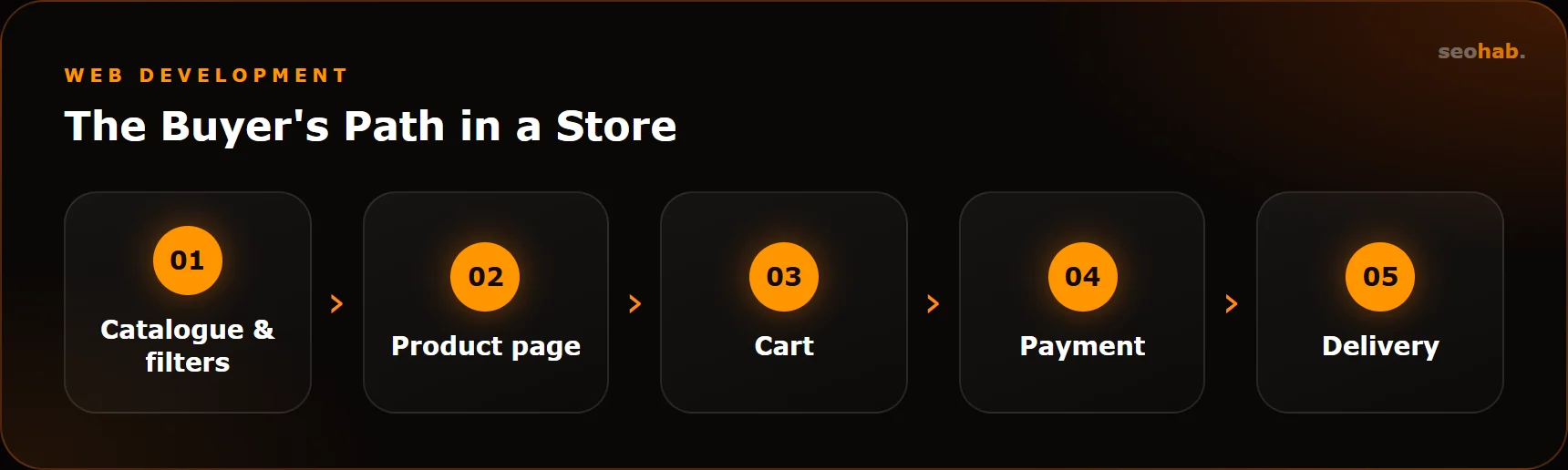
A good test is to walk the buyer's path from landing on the site to receiving the item and write down every step. Everything those steps require belongs in the launch version.
Catalogue, Product Pages, Search and Filters
Catalogue
Plan your category structure before adding products. Categories should match how buyers search, so check the wording in keyword tools such as Yandex Wordstat or Google Keyword Planner. Each category is a separate landing page for search, so it needs a clean URL, an H1 heading and a short introduction.
Product Page
The minimum: name, price, availability, several quality photos, specifications, description, delivery and returns terms, and an Add to cart button. If a product has variants — size, colour, volume — they should be selectable on the product page, not listed as separate items.
Product pages without descriptions or with identical copy index poorly and sell poorly. If your range is large, start with the most profitable and popular items.
Plan for reviews and ratings on product pages from the start, even if they stay empty at first. Over time, post-purchase reviews become one of the strongest arguments for new buyers.
Search and Filters
Site search is needed by almost any store with more than a couple of dozen products. It should tolerate typos and find items by SKU.
Filters are critical for categories with a wide range. Start with 3–6 truly important parameters: price, brand, size, a key specification. Dozens of filters at launch only make choosing harder and generate thousands of technical pages that must be blocked from indexing or optimised properly.
Think about sorting too: by price, popularity, newest. It is a simple feature that makes choosing noticeably easier.
If a category and filter combination has real demand — say, men's running shoes — turn it into a dedicated landing page with a clean URL, heading and description. Block other filter combinations from indexing to avoid duplicates.
Cart and Checkout
This is where most buyers are lost, so keep this stage as simple as possible:
- checkout without mandatory registration;
- minimal fields: name, phone, address or pickup point, payment method;
- the total including delivery is visible before confirmation;
- a clear order confirmation on screen and by email or message;
- smooth mobile experience: large buttons, autofill, correct keyboard types.
We cover removing obstacles on the way to an order in more detail in our guide on website conversion.
Payment and Delivery
Payment
At launch, card payments and local instant payment systems are usually enough, plus cash on delivery if it is common in your niche. For B2B, add invoicing. Remember fiscal requirements: in Russia, online sales require an online cash register and electronic receipts under Federal Law 54-FZ.
Delivery
Connect one or two delivery services your customers actually use, plus pickup if you offer it. Costs and timelines should be calculated automatically or at least clearly described. An unexpected delivery price at the final step is a common reason for abandoned carts.
Put all terms on a dedicated Delivery and Payment page and link to it from product pages and the cart. Describe returns and exchanges there too: buyers often check them before ordering.
Integrations You Need From Day One
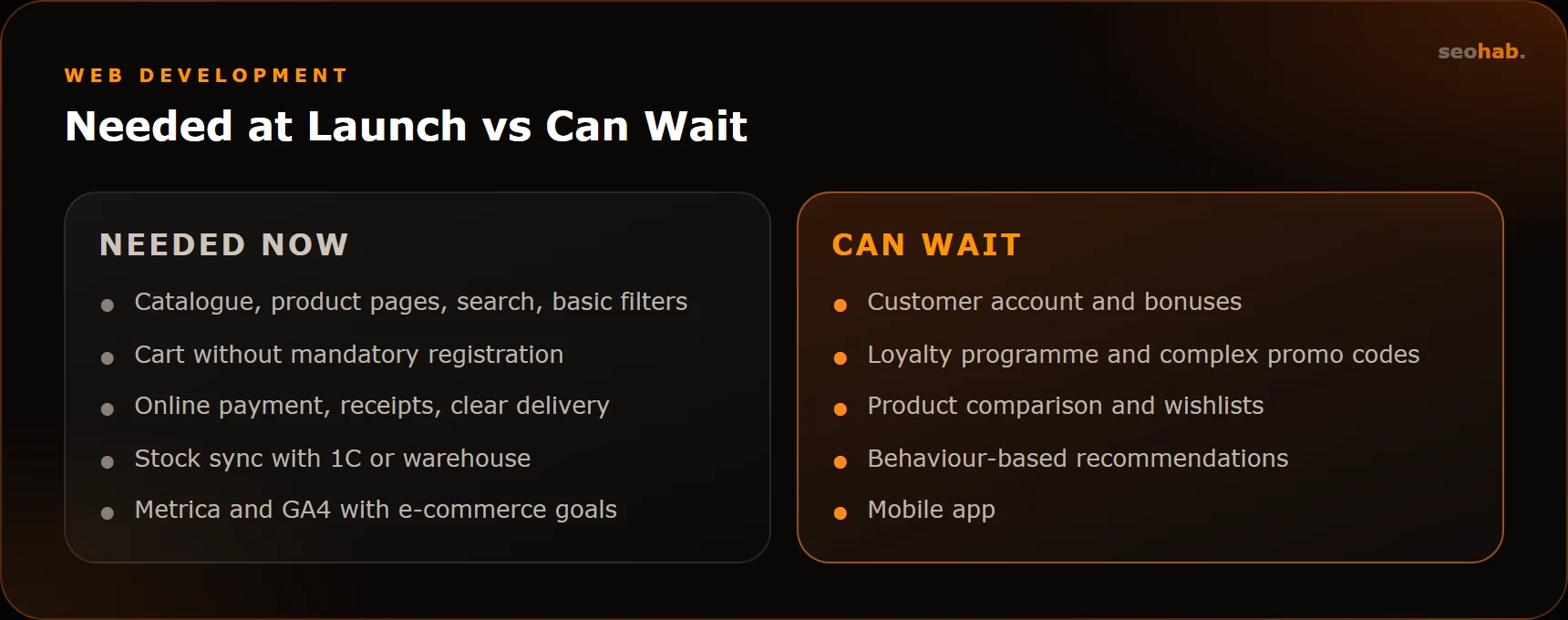
- Stock and price sync. If you use 1C or a warehouse system, set up the exchange right away. Manual stock updates lead to selling items you do not have.
- Order handling. Orders should land in a CRM or at least trigger an email and messenger notification so none are lost. This is where lead and CRM automation helps.
- Analytics. Yandex Metrica and GA4 with goals and e-commerce tracking: product view, add to cart, checkout, purchase.
- Search engines. Add the site to Google Search Console and Yandex Webmaster, submit sitemap.xml, check robots.txt.
- Product feeds — if you plan marketplace or shopping ads.
Also check catalogue and product page speed in PageSpeed Insights. The benchmark is Core Web Vitals: LCP ≤ 2.5 s, INP ≤ 200 ms, CLS ≤ 0.1.
What Can Wait Until Your First Sales
These features are useful, but their value only becomes clear with real data:
- a customer account with order history and bonuses;
- loyalty programmes, complex promo codes, cumulative discounts;
- product comparison and wishlists;
- behaviour-based recommendation blocks;
- multiple languages and currencies if you do not sell abroad;
- a mobile app;
- complex product configurators and calculators.
Make sure these features can be added later by choosing a platform and architecture you will not have to rewrite from scratch. This is decided during planning, not after launch.
How do you know it is time to add a feature? Rely on data, not gut feeling. If analytics shows buyers often return and reorder, it is time to think about accounts and bonuses. If session recordings show people switching back and forth between similar products, comparison makes sense. Every new feature should solve a problem you have already seen in the numbers or in customer questions.
Common Launch Mistakes
- Going live without testing checkout on a phone with a real payment.
- Empty product pages with no descriptions and low-quality supplier photos.
- Filters that create thousands of duplicates in the index.
- No Delivery and Payment, Returns or Contacts pages — buyers do not trust such stores.
- No analytics, so a month later you cannot tell where buyers drop off.
Before launch, place several test orders with different payment and delivery options, including a cancellation and a return. You will see the store through a buyer's eyes.
Summary
At launch, an online store needs a clear catalogue, complete product pages, search and basic filters, simple checkout, online payment, transparent delivery, stock sync and analytics. Bonuses, accounts, comparison and an app can wait until you have data on real buyers.
If you are planning a launch and want the right foundation from the start, see how we build online stores. For budget guidance, read our article on website development costs.
Read also
 Development
Website Security: Hack Protection, Updates and Backups — a Practical Minimum for Business
A practical website security minimum: updates, passwords and access, backups, monitoring and a clear plan for what to do after a hack.
 Development
Website Prototype: Why You Need One, How It Is Built and How It Differs from Design
What a website prototype is, which problems it solves before design and coding begin, how prototyping works and what to check before sign-off.
 Development
Website Redesign Without Losing Traffic: A Step-by-Step Plan
A step-by-step redesign plan that protects rankings and traffic: from a snapshot of your current site to monitoring in Search Console after launch.