
Local SEO means promoting a business for searches with a geographic intent: “dentist near me”, “tyre fitting on Main Street”, “coffee shop by the station”. For these queries Google and Yandex show a block with a map and business listings above the regular results. If you have an office, salon, shop or several locations, your map listing often brings in more calls than your website.
This guide covers how to set up listings in Google Business Profile and Yandex Maps, what affects their visibility, how to handle reviews and multiple branches, and how to connect your maps presence with your website.
How local search results work
When a query implies looking for a place, the search engine picks businesses based on three groups of factors. Google and Yandex describe them in much the same way:
- Relevance: how well the listing matches the query, including category, name, services and description.
- Distance: how far the location is from the user or from the area mentioned in the query.
- Prominence: reviews and ratings, mentions of the business online, listing activity and the website.
You cannot change distance, short of opening a new location. Relevance and prominence, however, are entirely in your hands. That is what local SEO is built on.
Google Business Profile: key settings
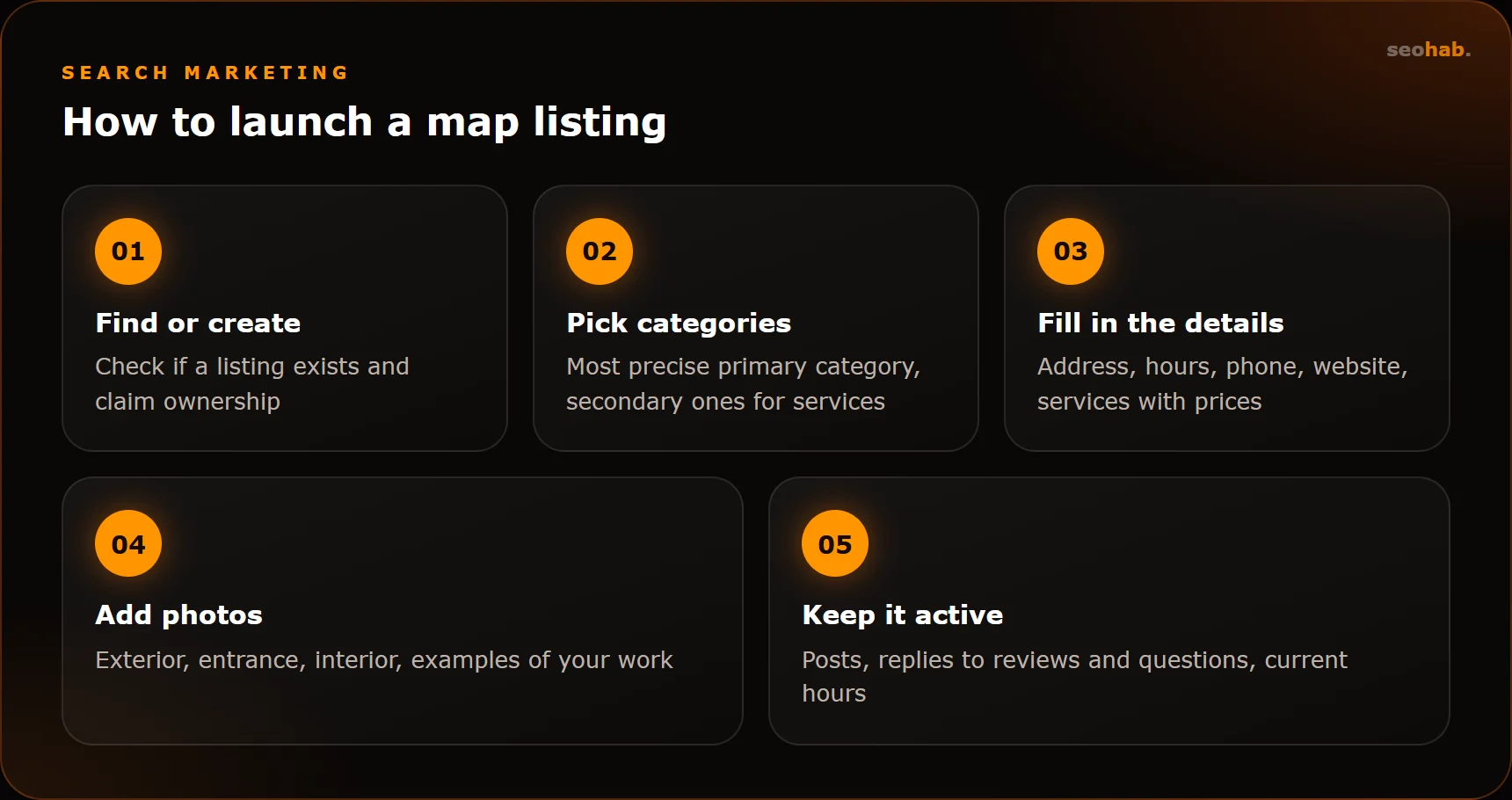
Google Business Profile (formerly Google My Business) is where you manage your Google listing. Start by checking whether your business is already on the map, since users may have added it. If it is, claim it; if not, create a new profile.
- Verification: Google may ask for a phone call, a video or another method. Until you are verified, editing is limited.
- Primary category: the single most important setting. Pick the most precise option, not a generic one.
- Service area: businesses that travel to customers, such as repairs or cleaning, can hide the address and list the areas they serve.
- Attributes: card payments, wheelchair access, parking and so on.
- Posts: news, offers and events published directly in the profile.
Google is strict about names: use only the real business name. The details are in Google’s official guidelines, which are worth reading before you launch.
Yandex Maps listing: what to fill in
If you also serve Russian-speaking markets, Yandex Maps matters as much as Google. Listings are managed through the Yandex Business service, and the logic is very similar.
- Name: exactly as on your signage, with no added keywords. Additions such as “best service in town” break the rules and can get the listing blocked.
- Categories: primary and secondary. They have the biggest influence on which queries you appear for.
- Address and entrance point: especially important in shopping malls and office centres.
- Opening hours, including holiday changes.
- Phone, website and messengers.
- Services and products with prices, plus photos of the exterior, entrance, interior and your work.
Keep both listings fresh: add photos, publish news and offers, answer questions. An abandoned listing loses to an active one.
Also check how your listings look in the mobile map apps, since that is where people searching nearby usually see them. The first photos and action buttons should immediately answer the key questions: how to get to you and how to get in touch.
Reviews: how to get them and how to respond
Reviews affect both map rankings and customer decisions. People see the rating before they even read the name. Managing reviews is an ongoing process, not a one-off campaign.
How to get more reviews
- Ask at the moment the customer is happy: when the job is done or the order is handed over.
- Give a direct link or QR code to your listing on the receipt, in a message or at the counter.
- Never buy reviews or write them yourself. Both platforms detect such schemes and may lower your rating or suspend the listing.
- Do not offer discounts in exchange for positive ratings; the rules explicitly forbid it.
How to respond
Reply to every review, including the positive ones. Respond to negative feedback calmly and to the point, offering to resolve the issue. Your reply is read not only by the author but by every future customer: a professional response to criticism builds more trust than a wall of perfect five-star ratings.
Multiple locations and branches
If you run a chain, every location needs its own listing with its own address, phone number and opening hours. A single listing for the whole city will not show up for searches from different neighbourhoods.
Both Google Business Profile and Yandex Business offer tools for managing chains: you can upload locations in bulk and edit shared details across all listings at once. Branch names should be identical, while addresses and contacts differ.
Each location also needs its own page on your website: address, directions, hours, photos, reviews and the services offered at that branch. Such a page helps search engines link the listing to the site and rank it in organic results for neighbourhood queries.
Connecting maps and your website
Local SEO does not stop at the map. The website strengthens the listing, and the listing strengthens the website.
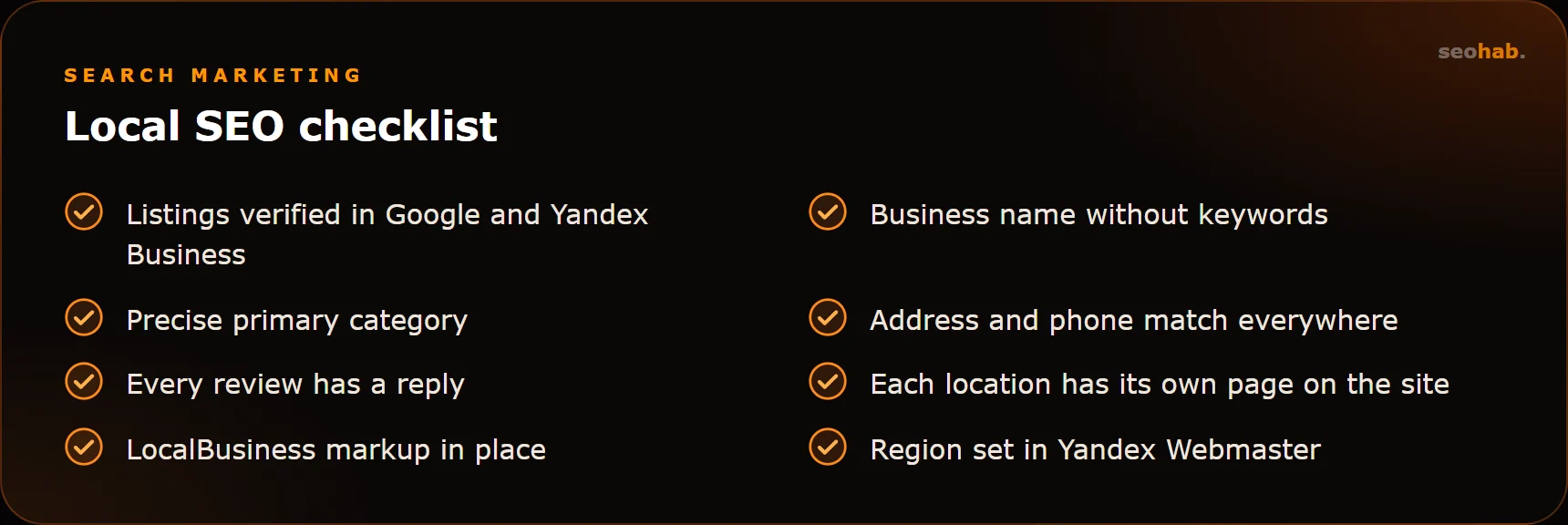
- Consistent details. Name, address and phone must match character for character on your site, map listings and business directories.
- Contacts as text, not as an image, plus an embedded map on the contacts page.
- Structured data: LocalBusiness markup from schema.org helps search engines understand your address, hours and business type.
- Region settings: in Yandex Webmaster, set your site’s region if you operate in one city.
- Landing pages for specific areas and services, not just the home page.
Local SEO mistakes and measuring results
Common mistakes
- Keywords stuffed into the listing name, which risks suspension.
- Outdated hours and phone numbers: the customer arrives at a closed door and leaves a negative review.
- Duplicate listings for the same location created at different times. They need to be merged through platform support.
- No replies to reviews, especially negative ones.
- One address on the website and another on the map after a move.
- A broad “just in case” category instead of a precise one, so the listing shows for irrelevant searches and gets lost for the right ones.
How to measure results
You cannot judge local SEO by gut feeling. Google Business Profile and Yandex Business both provide statistics: how often the listing was shown, how many people called, requested directions or visited the website. Focus on actions, not just views: growth in calls and direction requests matters more than a nice impressions chart.
To separate map traffic from everything else, add UTM tags to the website link in your listing. GA4 and Yandex Metrica will then show how many leads came from maps specifically. Calls are easiest to track with a dedicated number for the listing or call tracking.
Compare like-for-like periods: many local businesses are seasonal, and a dip over the holidays does not always mean something is wrong. Once a month, check the details across all listings, especially after a move or a change of phone number or hours.
Summary
Local SEO comes down to accurate and complete listings, a steady flow of genuine reviews, consistent contact details everywhere and a website with a page for every location. Start with an audit: find your listings, check the data and categories, remove duplicates. Then set up a regular routine for reviews and updates.
If you lack the time for maps and reviews, the SeoHab team can take them over as part of our online reputation management, while our SEO service optimises your website for local searches.
Read also
 SEO
How to Measure SEO Results: Metrics, KPIs and Reports to Demand From Your Agency
Which metrics show the real impact of SEO, which KPIs to put in the contract and how to read your agency's report so you see revenue, not just rankings.
 SEO
Schema.org Markup: Which Types Your Business Needs and How to Get Rich Results
Which Schema.org types a business website actually needs, how to implement and validate them, and what decides whether you get rich results in search.
 SEO
E-commerce SEO: Categories, Product Pages, Filters, Duplicates and Pagination
How to set up the catalog, categories, product pages, filters and pagination so your store gets traffic from Google and Yandex instead of drowning in duplicates.