
A technical SEO audit checks whether search engines can properly find, crawl and understand your pages. You can write excellent copy and build a perfect keyword map, but if pages are blocked from indexing or take ten seconds to load, the traffic won’t come.
Below is a practical checklist that a business owner or marketer can work through with free tools. Go in order, from indexing to speed and structured data — that way you catch critical problems first and cosmetic ones later.
What you need for a technical SEO audit
A minimal toolkit that covers most of the checks:
- Google Search Console — page indexing report, Core Web Vitals, URL inspection;
- Yandex Webmaster — indexing, crawl errors and site diagnostics for Yandex;
- Screaming Frog SEO Spider — a crawler that walks the site like a bot and collects status codes, meta tags and duplicates (the free version is limited to 500 URLs);
- PageSpeed Insights — speed and Core Web Vitals;
- structured data validators — Google’s Rich Results Test and the validator in Yandex Webmaster.
Log every issue in a table: problem — example URL — priority — owner. That turns the audit into a work plan rather than a list of complaints.
1. Indexing: can search engines see your pages?
Start with the basics: how many pages are indexed, and does that match reality?
- Compare the number of indexed pages (Search Console → Page indexing, Yandex Webmaster → Pages in search) with the number of useful pages on the site. A big gap either way signals a problem.
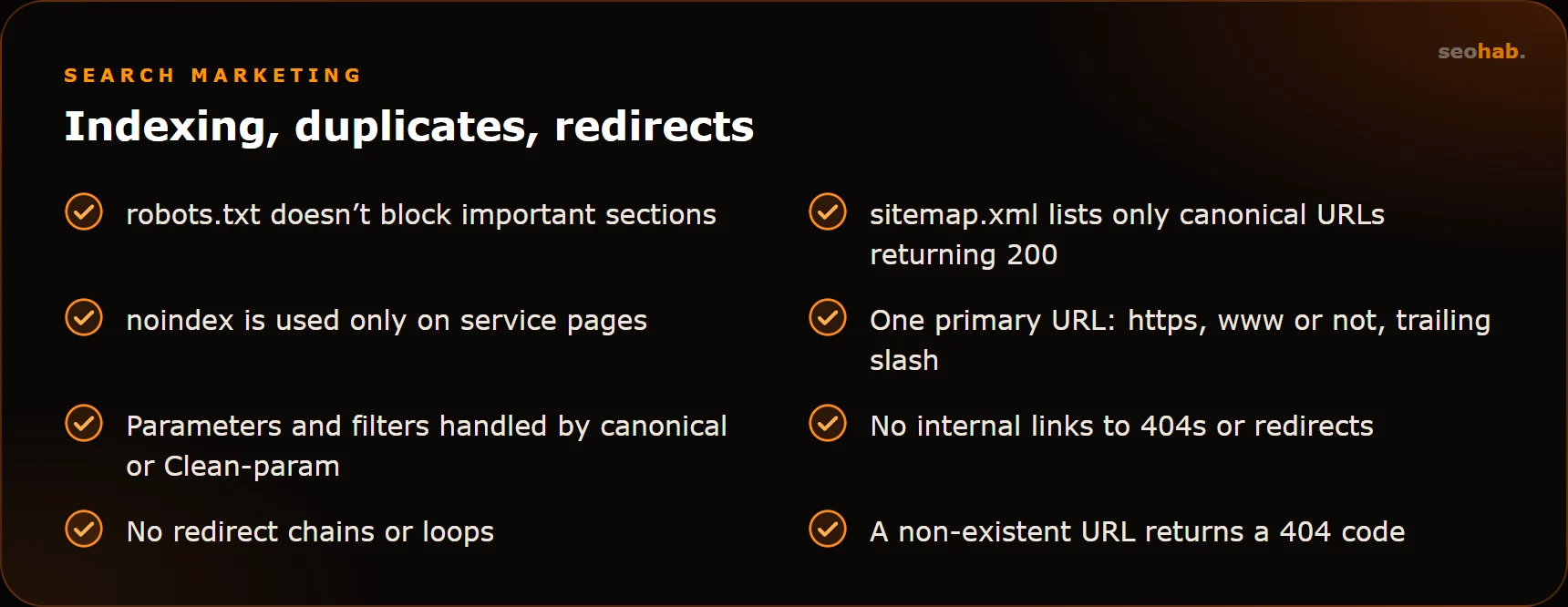
- Check robots.txt. Look for an accidental Disallow: / left over from a staging server, and make sure CSS and JS files aren’t blocked.
- Check sitemap.xml: it should list only canonical pages that return 200, with no redirects or blocked URLs.
- Find pages with noindex using a crawler and confirm that only service sections are excluded.
- Review excluded pages in Search Console and Webmaster — the exclusion reasons often point straight to the root cause.
- If the site runs on a JavaScript framework, use URL Inspection in Search Console to see what HTML the crawler actually gets. Text and links that appear only after scripts run may be indexed late or not at all.
2. Duplicates, status codes and redirects
Duplicate pages and canonical URLs
Duplicates dilute signals: the search engine can’t tell which version to show and may pick the wrong one. Typical sources of duplication:
- www and non-www, http and https versions;
- URLs with and without a trailing slash;
- query parameters: UTM tags, sorting, filters;
- pagination pages and print versions;
- one product listed in several categories under different URLs.
The fixes are a 301 redirect to the main version, a rel="canonical" tag, or the Clean-param directive in robots.txt for Yandex. The key is choosing one primary URL for every page and consistently linking only to it. Duplicate titles and descriptions are easy to spot in Screaming Frog under Page Titles and Meta Description.
Status codes and redirects
Crawl the site and filter pages by server response code:
- 4xx — broken pages. If internal links point to them, fix the links or redirect to a relevant page.
- 5xx — server errors. Contact your developer or host right away.
- 3xx — redirects. Make sure permanent moves use 301, not 302.
Look separately for redirect chains and loops: A → B → C or A → B → A. Every extra hop slows loading and wastes crawl budget. Internal links should point straight to the final URL. Also confirm that a non-existent URL returns a real 404 code, not a 200 with a “page not found” message (a soft 404).
3. Page speed and Core Web Vitals
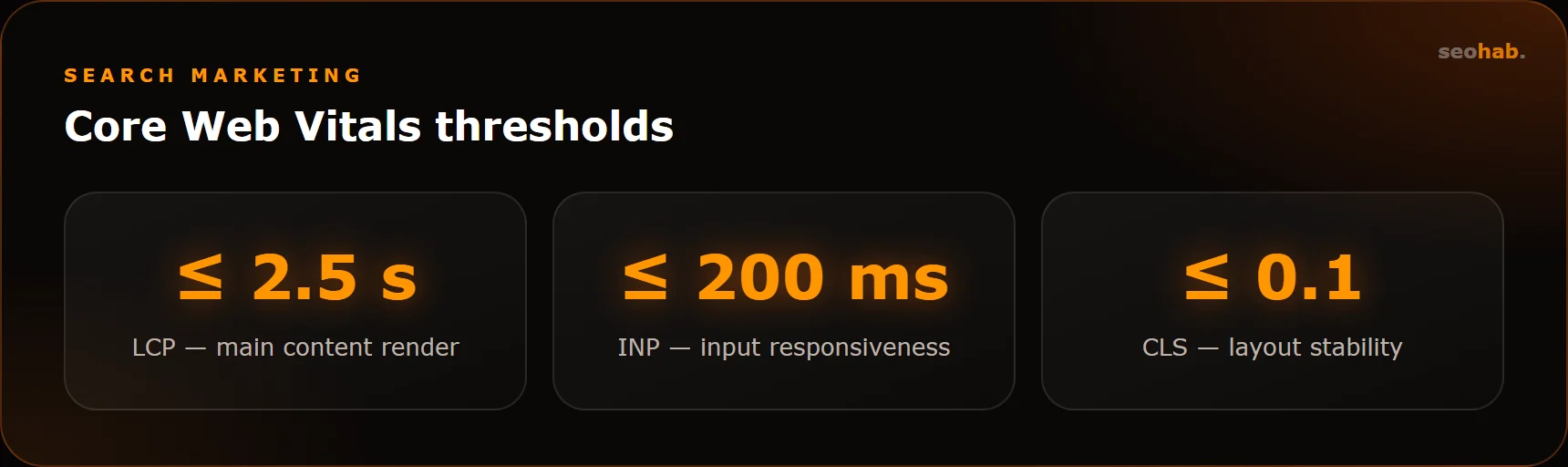
Speed affects both rankings and conversion. Google measures it with Core Web Vitals, and these values count as good:
- LCP ≤ 2.5 s — time to render the main content;
- INP ≤ 200 ms — responsiveness to user input;
- CLS ≤ 0.1 — layout stability, no jumping blocks.
Test more than the home page in PageSpeed Insights: check template pages such as a product page, a category and an article. Focus on field data from real users rather than just the lab score. Common culprits are heavy images without modern formats, extra analytics and widget scripts, missing caching and underpowered hosting.
For the big picture, open the Core Web Vitals report in Search Console: it groups pages with similar issues. You may see, for example, that every product page is slow — which means the template needs fixing, not each page individually.
4. Mobile version
Search engines primarily evaluate the mobile version of a site, so mobile problems are SEO problems across the board. What to check:
- a meta viewport tag and responsive layout without horizontal scrolling;
- readable text without zooming and tap targets that aren’t crammed together;
- whether content matches between mobile and desktop — text blocks and links hidden on mobile may not be counted;
- pop-ups and cookie banners that cover the content.
The most honest test is to open key pages on your own phone over mobile data and try to submit a request.
5. Structured data and meta tags
Schema.org markup helps search engines understand a page and can enrich its snippet. Typical types for a business are Organization, LocalBusiness, Product, BreadcrumbList, FAQPage and Article.
Validate the markup in the Rich Results Test and in Yandex Webmaster: check for errors and warnings, and make sure the data matches what users see. Markup describing content that isn’t on the page violates the guidelines — it isn’t a clever trick.
In the same pass, check the basic meta tags: every page has a unique title, a description and a single h1, and hreflang attributes on multilingual sites point to pages that actually exist.
6. Prioritizing after the audit
You’ll end up with a long list. Don’t try to fix everything at once — split the tasks into three groups:
- Critical: important pages blocked from indexing, 5xx errors, mass duplication, a broken mobile version.
- Important: redirect chains, broken internal links, poor Core Web Vitals on key templates.
- Nice to have: markup warnings, minor duplicate meta tags, optimizing individual images.
After fixing, request recrawling of key pages in Search Console and Webmaster, then crawl the site again a couple of weeks later. Run a technical audit after every major site update and, as prevention, at least once a quarter.
Summary
A technical SEO audit boils down to a simple sequence: indexing → duplicates → status codes and redirects → speed → mobile → structured data. Until technical barriers are removed, content and link work delivers only part of its potential.
If the issues you find require code changes, you can hand them to us as part of website improvements. A full audit with a fix plan and ongoing promotion is included in our SEO services.
Read also
 SEO
SEO
Title and Meta Description Tags: Rules and Examples for Different Page Types
How to write title tags and meta descriptions that help pages rank and earn clicks: practical rules, templates for every page type and common mistakes.
 SEO
SEO
Keyword Research and Semantic Core: A Step-by-Step Guide
How to build a semantic core yourself: keyword sources, cleaning, clustering and mapping queries to pages on your site.
 SEO
SEO
SEO or PPC Advertising: Which Should Your Business Choose?
Compare SEO and PPC by speed, cost per lead and long-term value. Learn when SEO pays off, when PPC wins and how to combine them without overspending.